The verdict up front
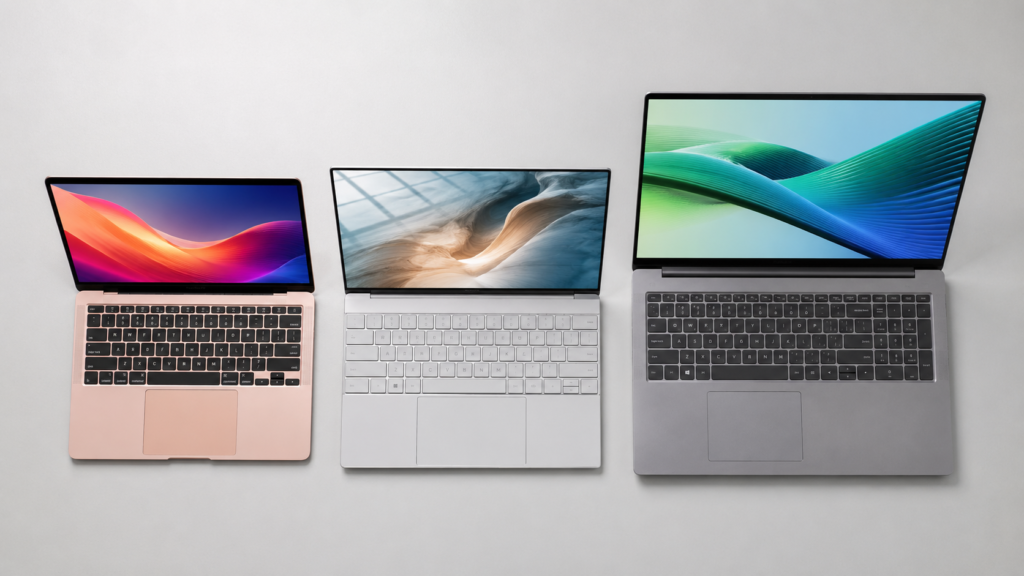
Buy the MacBook Neo ($599) if you want the most polished budget laptop money can buy right now — it out-benches every Windows rival in this price range on single-core speed, runs cool and quiet with no fan, and gets a real 13+ hours of battery in independent testing. Buy the Dell XPS 13 (2026) ($699) if you’re staying on Windows for software reasons and want the closest thing to Apple-level build quality on that side — sharper screen, backlit keyboard, lighter than the Neo. Buy the Acer Aspire 16 AI if RAM is your priority: it doubles the Neo’s and XPS 13’s 8GB to 16GB for similar or less money, at the cost of a flimsier chassis. None of these are “get whatever’s cheapest” purchases — each has one real compromise a spec sheet won’t show you, and this article is about which compromise you can actually live with.
At a glance: how the three compare
| MacBook Neo | Dell XPS 13 (2026) | Acer Aspire 16 AI | |
|---|---|---|---|
| Price (as tested, Aug 2026) | $599 (256GB/8GB) | $699 (512GB/8GB) — $599 for students | $699 MSRP list ($729.99 top config), frequently discounted to $450–550 |
| RAM | 8GB, fixed, non-upgradable | 8GB at this price tier, fixed | 16GB — double the other two |
| Storage | 256GB SSD, soldered | 512GB SSD | 512GB SSD |
| Display | 13.0″, 2408×1506, 60Hz, sRGB only | 13.4″, 2560×1600, 120Hz, touch | 16″ (largest), 1920×1200, 120Hz |
| Weight | 2.7 lbs | 2.2 lbs — lightest | Heaviest of the three (16″ chassis) |
| Battery, independently tested | 13:28 (Tom’s Hardware rundown) | 14:30 (Tom’s Guide rundown) | 15:30 (PCWorld video-loop test — different method, not directly comparable) |
| Chip | Apple A18 Pro (ARM, 2P+4E) | Intel Core 5 320 “Wildcat Lake” (x86, 2P+4E) | Qualcomm Snapdragon X (ARM, 8-core) |
| Keyboard backlight | No — first Apple laptop in 15+ years without one | Yes | Not confirmed in this research — check before buying |
| Ports | 2× USB-C (one USB 3, one USB 2), unlabeled | USB-C, more clearly marked | USB-C + USB-A, loses one port while charging |
| Real drawback | Fixed 8GB RAM, no keyboard backlight | 8GB base RAM strains Windows 11 harder than macOS | Flimsy chassis flex; ARM chip blocks some Windows software |
Performance: the Neo wins the benchmark that matters most for this price bracket
Tom’s Hardware ran the MacBook Neo through Geekbench 6 and got a single-core score of 3,535 — ahead of the M3 MacBook Air (3,082) and a Snapdragon X Plus-powered Surface Laptop (2,486) in the same test suite. Single-core is the number that actually matters for a $600 laptop, since most buyers are browsing, writing, and streaming rather than rendering video — tasks that lean on one fast core, not eight mediocre ones.
The Dell XPS 13’s Intel Core 5 320 “Wildcat Lake” chip trails the A18 Pro by roughly 22% on single-core tests and by a smaller 3% on multi-core, according to comparative benchmark reporting. [UNVERIFIED: exact percentage gap between A18 Pro and Core 5 320 — figures come from aggregated benchmark comparisons rather than a single outlet running both chips through identical hardware and software; treat as directional.] The Acer Aspire 16 AI’s Snapdragon X chip wasn’t tested against either of these directly in the sources for this article, but Qualcomm’s Snapdragon X family has shown the same general pattern in other reviews: behind Apple’s phone-derived silicon on single-core, closer or ahead on multi-core thanks to more cores.
None of the three will edit 4K video or compile a large codebase comfortably — Tom’s Hardware’s Cinebench stress test took over 14 minutes on the Neo and showed clear throttling, and the Wildcat Lake chip in the XPS 13 is explicitly Intel’s low-end part, not built for sustained heavy loads either.
RAM: 8GB hurts more on Windows than on macOS
This is the least intuitive part of the comparison. Both the Neo and the entry Dell XPS 13 ship with a fixed 8GB of RAM, and reviewers have flagged both for it — but the complaint lands harder on the Dell. One reviewer testing the XPS 13 found that running Slack alongside two Chrome windows with about 20 tabs each ate close to 14.5GB of memory, and Windows 11 idles at over 40% memory usage with nothing but Task Manager open. macOS is simply lighter on idle overhead, so the same 8GB goes further on the Neo for typical browsing-and-writing workloads, even though neither is a machine you’d want for heavy multitasking.
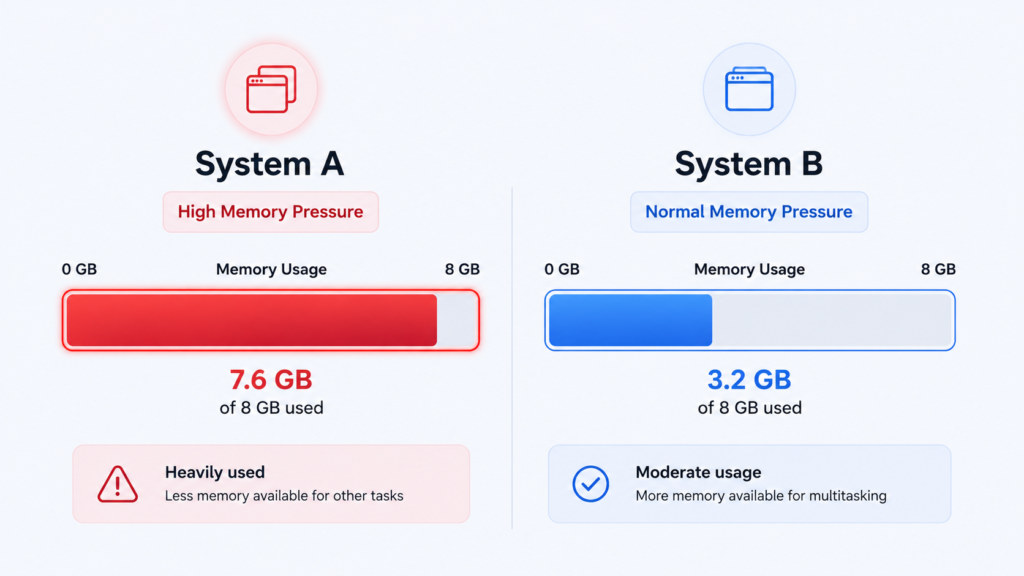
The Acer Aspire 16 AI sidesteps this entirely with 16GB standard — if multitasking headroom matters more to you than brand or build quality, that’s the actual reason to pick it over either Apple or Dell’s entry configuration, not the chip.
Build quality and design: two premium feels, one compromise
Tom’s Hardware called the Neo’s aluminum chassis “the real deal,” not a cut-down feel despite the price, and gave it their Editor’s Choice award. The Dell XPS 13 goes even further on paper — at 2.2 lbs and 0.5 inches thick, it’s Dell’s thinnest, lightest XPS ever, with a sharper 2560×1600 120Hz touchscreen and a backlit keyboard the Neo doesn’t have.
That keyboard backlight gap is worth dwelling on: the MacBook Neo is the first Apple laptop in more than 15 years without one. It’s a deliberate cost-cut, and touch typists may genuinely never notice it, but anyone who glances at their keys — including in dim dorm rooms or on red-eye flights — will feel this daily. It’s the single most-cited criticism across MacBook Neo reviews, ahead of even the RAM limit.
The Acer Aspire 16 AI is the outlier here: PCWorld and other reviewers noted real chassis flex and a hinge that isn’t as stable as the other two, the tradeoff for its bigger 16-inch screen and lower price. It’s the laptop most likely to feel like a budget laptop when you pick it up, even though its spec sheet reads better than either rival’s.
Battery life: strong across the board, but methods differ
All three comfortably clear a school day. Tom’s Hardware measured the Neo at 13 hours 28 minutes in a mixed streaming-and-browsing rundown; Tom’s Guide measured the Dell XPS 13 at roughly 14 hours 30 minutes using a similar methodology. PCWorld’s 15.5-hour figure for the Acer Aspire 16 AI came from a looped local video playback test at 250 nits — an easier, best-case workload than the other two tests, so treat that number as directionally strong rather than directly comparable. In practice, expect all three to get you through a full day of classes without a charger, with the Neo and XPS 13 numbers being the more apples-to-apples comparison of the group.
Where reviewers disagree
The MacBook Neo’s reception hasn’t been uniformly glowing. Tom’s Hardware gave it Editor’s Choice, but the comment section under that same review — and a chunk of the wider enthusiast conversation — pushed back hard on the idea that 8GB of RAM and a non-upgradable SSD are acceptable in 2026, pointing out that comparable-priced Windows and Android hardware ships with two to four times the RAM. The professional-review consensus is that typical buyers (email, browsing, docs, light photo work) won’t hit that ceiling for years; the enthusiast counter-argument is that “typical buyers” often don’t know why their machine feels slow, and a soldered 8GB doesn’t age gracefully regardless of who’s using it. Both things can be true at once, which is why this is worth taking seriously before you buy rather than after.
There’s a smaller disagreement on the Windows side too: some coverage frames the Dell XPS 13 as “the MacBook Neo of PCs” — high praise — while performance-focused reviewers are more blunt that its base 8GB configuration is arguably a worse fit for Windows 11’s overhead than the same RAM is for macOS on the Neo.
Who should buy which
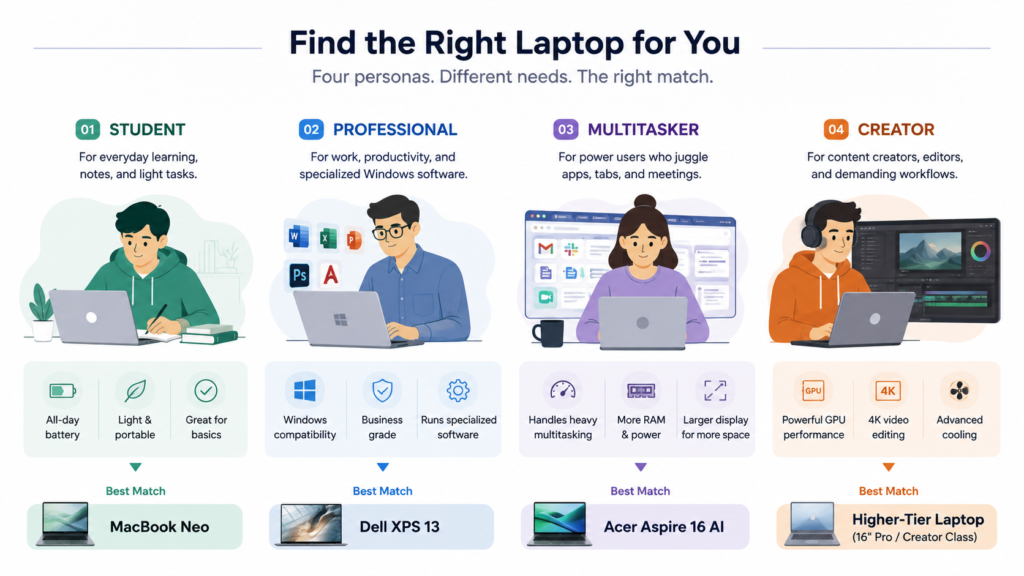
Students who mainly write papers, browse, and stream video: the MacBook Neo. It’s the fastest single-core chip in this price bracket, the battery life is real, and macOS ships without the trialware bloat common on budget Windows machines.
Anyone who needs Windows-only software (specific engineering, CAD, or legacy business apps): the Dell XPS 13. You get a sharper touchscreen, a backlit keyboard, and a lighter chassis than the Neo, in exchange for slightly slower single-core performance and the same 8GB RAM ceiling.
Multitaskers who keep a dozen browser tabs and several apps open at once: the Acer Aspire 16 AI. Sixteen gigs of RAM at this price is the actual differentiator, not the chip — just expect a less rigid chassis than the other two.
Anyone who’s already invested in Apple’s ecosystem (iPhone, iCloud, AirDrop): the Neo, for the integration alone — iPhone Mirroring and Continuity features aren’t available on either Windows machine.
Creators who edit video or do serious multitasking regularly: none of these three. All three are built for light, everyday computing; step up to a MacBook Air (16GB+) or a Windows laptop with a proper mid-range chip if your workload is heavier than email and essays.
What would change this recommendation
Dell explicitly built the XPS 13 (2026) to go after the Neo’s price point, which means this is an active price war, not a settled market — expect further undercutting from other Windows OEMs (Lenovo’s IdeaPad Slim 5 16 and similar 16GB-RAM machines around $600 are worth a look if you want more memory without Acer’s build-quality tradeoff, though pricing on that specific model wasn’t reliably confirmed in this research). [UNVERIFIED: current Lenovo IdeaPad Slim 5 16 (2026, Ryzen AI 300-series) pricing — search results mixed this generation with an older 2023 Ryzen 5 7530U model; confirm current SKU and price directly with Lenovo or a major retailer before including it as a recommendation.] If you can wait, back-to-school and Black Friday discounting typically pulls all three of these below their list prices within a few months of a fall purchase window.
FAQ
Is 8GB of RAM enough for a MacBook Neo in 2026?
For browsing, email, streaming, writing, and light photo editing, yes — Tom’s Hardware’s hands-on testing found it handled these tasks smoothly, with slowdowns only in heavier multitasking or file transfers. If you routinely run many apps at once or don’t know your usage pattern will stay light, size up to a machine with 16GB, since the Neo’s RAM can’t be upgraded later.
Does the MacBook Neo have a backlit keyboard?
No. It’s the first Apple laptop in over 15 years to ship without one — a deliberate cost-cutting measure. If you type by feel this won’t matter, but if you look at your keys, especially in dim rooms, you’ll notice it daily.
Is the Dell XPS 13 (2026) a real MacBook Neo competitor?
Yes — Dell built it specifically to compete at this price point, and several outlets have directly compared the two. It has a sharper touchscreen, backlit keyboard, and lighter chassis, but its Wildcat Lake chip trails the A18 Pro on single-core performance and its base config shares the same 8GB RAM limitation.
Which of these three has the best battery life?
All three exceed a full school day. The Dell XPS 13 tested slightly ahead of the MacBook Neo in comparable rundown tests (about 14:30 vs. 13:28), while the Acer Aspire 16 AI’s 15.5-hour figure came from an easier, best-case local-video test, so it isn’t a direct apples-to-apples comparison with the other two.
Should I get a Windows laptop with more RAM instead of the MacBook Neo?
If multitasking is your priority, the Acer Aspire 16 AI’s 16GB is a real advantage over either 8GB machine. If your priority is single-core speed, battery efficiency, and build quality, the Neo’s smaller RAM pool is less of a practical problem than the spec sheet implies, according to hands-on reviews.