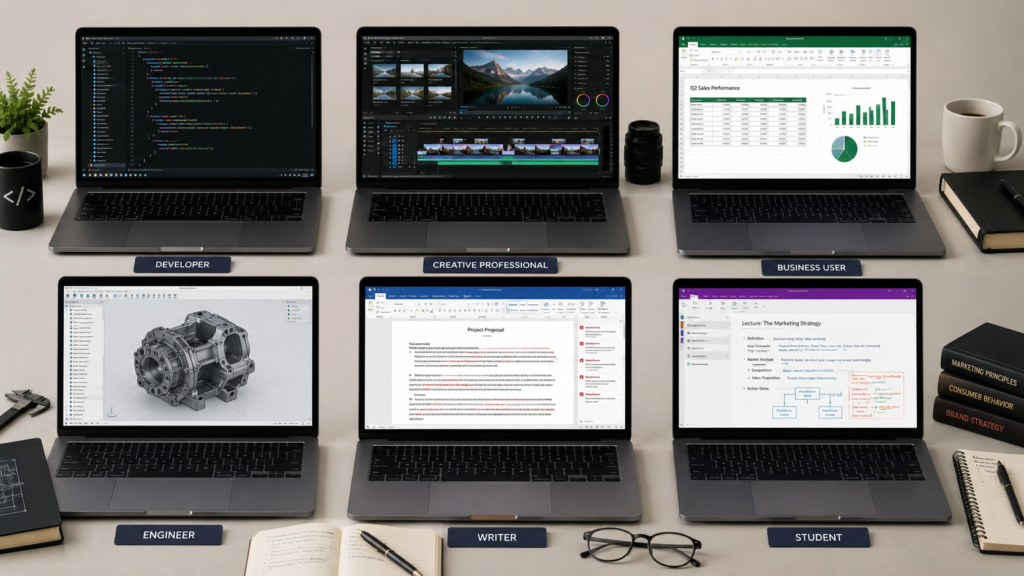
A note on scope: this guide covers six of the most common buyer profiles — students, software developers, creative professionals, business and office professionals, engineers/data scientists/CAD users, and writers and researchers. If your work spans two of these (a coding student, a video editor who also travels for client meetings), read both relevant sections — the “Who should buy which” section near the end covers exactly that overlap.
The short version
The single biggest mistake in laptop shopping is buying from a generic “best laptops” list instead of matching the machine to what you actually do all day. A student needs battery life and a low price above almost everything else; a video editor needs a color-accurate display and a GPU that won’t throttle mid-export; a business traveler needs weight and security features a gamer would never think about. Quick answers, all confirmed against live 2026 pricing: students should look at the Lenovo IdeaPad Slim 3x ($699.99) or step up to a MacBook Air M5 (~$1,199–1,299); developers should consider the Dell XPS 14 (~$1,599.99) or a MacBook Pro 14″ M5 Pro ($2,199); creative professionals should look at that same MacBook Pro or the GPU-heavy ASUS ProArt P16; business travelers should look at a ThinkPad T14 or X1 Carbon; engineers and data scientists need real GPU horsepower from something like a Lenovo Legion Pro 7i; and writers chasing all-day battery life should look at the ASUS Zenbook A14 or a MacBook Air. Full reasoning, specs, and sourced drawbacks for every pick are below.
Best laptop by profession, at a glance
| Profession | Recommended pick (starting price) | Why it fits | Skip it if… |
|---|---|---|---|
| Students | Lenovo IdeaPad Slim 3x — $699.99 | 16h29m of tested battery life for a sub-$700 machine | You need x86 app compatibility for CS coursework — see the MacBook Air option instead |
| Software developers | Dell XPS 14 — ~$1,599.99 | Strong sustained multi-core performance, 20h41m tested battery, official Ubuntu edition available | You want the best keyboard on the market — its shallow, lattice-free layout increases typos |
| Creative professionals | MacBook Pro 14″ (M5 Pro) — $2,199 | Best-in-class color-accurate display and sustained creative-app performance for most workloads | You’re doing heavy, hours-long 4K/8K exports — the chassis has documented thermal headroom limits at its top chip tiers |
| Business & office pros | Lenovo ThinkPad T14 Gen 6 — $1,371.80 | Enterprise security, ~9 hours of real business-day battery, sub-3.1 lb | You want the best-in-class keyboard and near-24-hour battery — step up to the X1 Carbon |
| Engineers & data scientists | Lenovo Legion Pro 7i (RTX 5080) — $2,649 (sale) | Real CUDA/GPU horsepower and a 240Hz OLED for CAD/3D detail work | You need ISV-certified CAD drivers — true workstation cards run $5,660+ |
| Writers & researchers | ASUS Zenbook A14 — $999.99 | 18h20m of tested battery life at 2.16 lb | You need a matte, glare-free screen — no pick under $2,000 currently offers one |
The specs that matter — and the ones that don’t
RAM needs differ enormously by profession, and the generic “16GB is plenty” advice is only true for some of these buyers. A student browsing, note-taking, and writing essays is fine at 16GB. A developer running Docker containers or a couple of VMs alongside an IDE should treat 16GB as a floor, not a target, and consider 32GB. A creative professional working in Premiere or Resolve with large timelines, or an engineer training models or running CAD assemblies, should be looking at 32GB minimum and often 64GB.
GPU power is the one spec that’s either irrelevant or the single most important thing, with almost no middle ground. For students, writers, and most business professionals, integrated graphics are genuinely fine — a discrete GPU in that context is wasted money and wasted battery life. For creative professionals and engineers/data scientists, GPU class directly determines how long you wait for an export or a model training run to finish, and it’s worth spending on before almost anything else on the spec sheet.
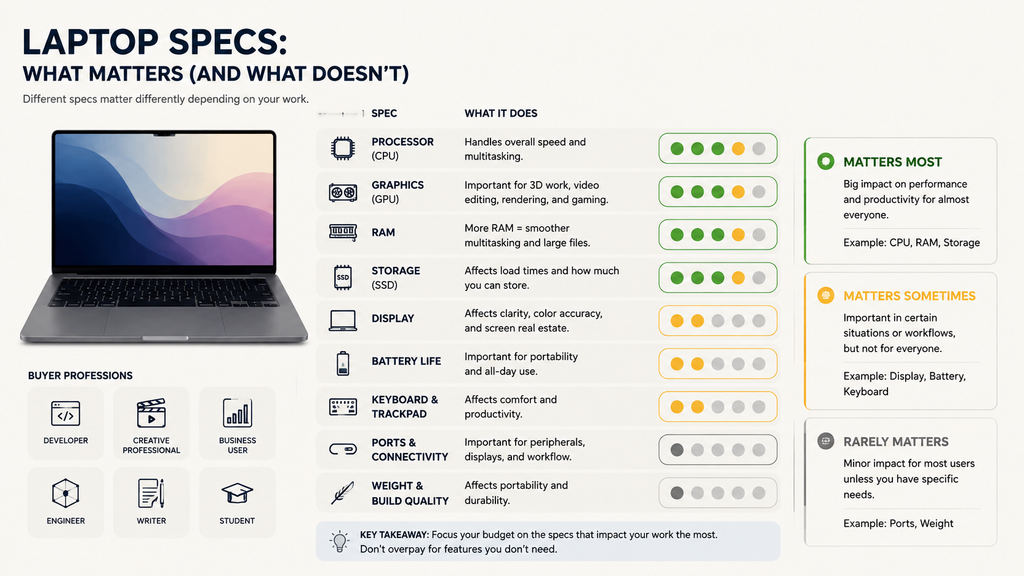
Battery life claims on the box are marketing numbers, not real numbers — and the gap between the two varies by workload, not just by laptop. Apple’s MacBook Air M5 is rated “up to 18 hours,” but independent testing measured 15.5–15h37m under mixed real use — still excellent, just not what’s printed on the box. The gap gets much larger under heavy workloads: a ThinkPad X1 Carbon Gen 14 rated for nearly 24 hours on a pure video-rundown test measured only 5–7 hours during an actual writing/browsing/email workday in one independent review. Read battery claims as “best case,” and weight real-world reviewer testing over the manufacturer’s number, especially if your work is GPU- or CPU-intensive rather than light browsing.
Weight matters in direct proportion to how often the laptop leaves your desk. For business travelers and students, a pound of difference is felt every single day. For engineers and creative professionals working mostly at a desk with occasional GPU-heavy loads, weight matters far less than sustained performance and cooling — and trying to get both in one machine (thin and light AND powerful under sustained load) is where thermal throttling complaints consistently show up in reviews.
Best laptops for students
Battery life, weight, and price dominate this category — a student moves between classes without guaranteed outlet access, carries the machine in a backpack all day, and is usually price-constrained. For CS or engineering majors, add one more consideration: ARM-based machines (Qualcomm Snapdragon, in this case) can hit compatibility snags with certain dev tools, VMs, or engineering software that expects x86.
| Budget pick | Mid-range pick | |
|---|---|---|
| Model | Lenovo IdeaPad Slim 3x (15.3″) | Apple MacBook Air 13″ (M5) |
| Price | $699.99 (Best Buy, Aug 2026) | ~$1,199–1,299 [UNVERIFIED: Apple’s launch MSRP was $1,099 for 16GB/512GB in March 2026; multiple outlets report a mid-2026 price increase to $1,299, with Amazon selling around $1,199 as of late July 2026 — confirm today’s live Apple.com price before publishing] |
| CPU / RAM / storage | Snapdragon X (8-core) / 16GB / 512GB | Apple M5 (10-core) / 16GB / 512GB |
| Display | 15.3″ IPS touchscreen, 1920×1200 | 13.6″ Liquid Retina, 2560×1664 |
| Battery (tested) | 16h29m (Tom’s Guide) | 15.5h (TechRadar); 16h11m at 150 nits, dropping to 6h39m at full brightness (Notebookcheck) |
| Weight | 3.42 lb | 2.7 lb |
Drawback, budget pick: Tom’s Guide measured weak display quality — “only 296.2 nits average brightness and 48.4% DCI-P3 color gamut… pretty low even for a budget laptop” — and found it’s “definitely not a good pick for gamers.” Being ARM-based, some apps and games aren’t compatible, which matters if a CS-track student needs specific x86 dev tools.
Drawback, mid-range pick: Tom’s Guide called the M5 upgrade over the M4 “relatively modest,” and Notebookcheck found battery life at full brightness actually dropped about 6% versus the M4, since both share the same 53.8Wh battery despite the M5 drawing more power.
Best laptops for software developers
Sustained multi-core performance for compiling and running containers matters more than peak clock speed, and 16GB should be treated as a practical minimum rather than a comfortable target — 32GB is worth the upgrade if you regularly run VMs or Docker alongside an IDE and browser. Keyboard quality and Linux compatibility matter daily in ways they don’t for other buyers on this list.
| Mid-range pick | Premium pick | |
|---|---|---|
| Model | Dell XPS 14 (2026) | Apple MacBook Pro 14″ (M5 Pro) |
| Price | ~$1,599.99 [UNVERIFIED: sources disagree — Dell.com listed a base config around $1,549.99–$1,599.99, while Tom’s Hardware’s higher-CPU review unit was priced at $1,699.99; confirm current config-to-price mapping before publishing] | $2,199 (Apple launch price, confirmed via AppleInsider and Apple Newsroom) |
| CPU / RAM / storage | Intel Core Ultra 7 355 / 16GB / 512GB | Apple M5 Pro (15-core) / 24GB / 1TB |
| Display | 14″ IPS, 1920×1200, 1–120Hz | 14.2″ Liquid Retina XDR, 3024×1964, up to 120Hz |
| Battery (tested) | 20h41m (Tom’s Hardware) | Apple claims up to 14h wireless web; CGMagazine found real developer-style use closer to 10–12 hours |
| Weight | ~3.0 lb | 3.5 lb |
| Linux option | Dell sells a factory Ubuntu edition of the same chassis | Not applicable (macOS only) |
Drawback, mid-range pick: Tom’s Hardware’s reviewer found the “low-travel, lattice-free keyboard made me more error-prone,” with only 0.8mm of key travel — their typing accuracy dropped from a typical 98% to 95% on this specific keyboard, and the layout crowds the arrow keys.
Drawback, premium pick: TechRadar and CGMagazine both describe the M5-generation MacBook Pro as an iterative upgrade with no design change from the M4 generation, and the base M5 tier still ships with Wi-Fi 6E rather than Wi-Fi 7 (the M5 Pro tier reviewed here does get Thunderbolt 5, but the broader lineup lag is worth knowing).
Best laptops for creative professionals
Color accuracy and GPU power decide this category more than any other spec. Near-100% DCI-P3 coverage with factory calibration matters for anything color-critical, GPU class scales almost linearly with export/render speed, and 32GB+ RAM is the realistic floor for large Premiere timelines or multi-layer Photoshop files. Sustained performance under load — not a single benchmark run — is what actually predicts how a laptop behaves during a real hour-long export.
| Mid/upper pick | Premium pick | |
|---|---|---|
| Model | Apple MacBook Pro 14″ (M5 Pro) | ASUS ProArt P16 (RTX 5090) |
| Price | $2,199 (B&H Photo, July 2026) | $3,999.99 at official launch (ASUS, Dec 2025) [UNVERIFIED: a live Best Buy listing for the same core configuration currently shows $5,499.99 — a roughly 38% gap I could not reconcile with a live source; verify current street price before publishing] |
| CPU / GPU | Apple M5 Pro (15-core CPU, 16-core GPU) | AMD Ryzen AI 9 HX 370 + RTX 5090 Laptop GPU, 24GB GDDR7 |
| RAM / storage | 24GB / 1TB | 64GB / 4TB |
| Display | 14.2″ Liquid Retina XDR, up to 1,600 nits peak HDR | 16″ 4K OLED touchscreen, 100% DCI-P3, up to 1,600 nits peak HDR |
| Battery | Apple claims up to 22h video / 14h wireless web (marketing figures, not creative-workload tested) | 90Wh battery; TechRadar measured only 4–6 hours under Premiere Pro at Performance mode |
| Weight | 3.5 lb | ~4.2–4.3 lb [UNVERIFIED: exact weight — three sources gave figures between 4.25 and 4.30 lb] |
Drawback, mid/upper pick: Notebookcheck’s review of the related 14-inch chassis with the higher-end M5 Max chip found “the cooling simply cannot handle the M5 Max adequately,” measuring a 24% performance drop during a 30-minute sustained stress test and fan noise up to 53.2 dB(A). [UNVERIFIED: this specific throttling data was measured on the M5 Max chip variant, not the M5 Pro config recommended here — the shared chassis and cooling design make it a relevant caution, but the exact throttle percentage for the M5 Pro itself wasn’t independently tested in the sources found.]
Drawback, premium pick: TechRadar found that under sustained Premiere Pro exports in Performance mode, the ProArt P16 delivers only roughly 4 to 6 hours of battery life (versus 10+ hours in lighter, Auto-mode use), and fans audibly ramp up under render load — louder than a comparable MacBook Pro, though performance stayed consistent rather than throttling.
Best laptops for business & office professionals
Weight, real-world battery life, security features (fingerprint reader, TPM, enterprise manageability), and a decent webcam for video calls matter here — raw GPU or CPU horsepower explicitly doesn’t. Reviewers consistently test these machines on actual travel and workday use rather than lab benchmarks, which is the right way to evaluate them.
| Mid-range pick | Premium pick | |
|---|---|---|
| Model | Lenovo ThinkPad T14 Gen 6 (AMD) | Lenovo ThinkPad X1 Carbon Gen 14 (Aura Edition) |
| Price | $1,371.80, regular $1,444 (Lenovo.com) [UNVERIFIED: this exact configuration showed as “Temporarily Unavailable” on Lenovo’s own site at time of research, despite displaying a live price and ship date — confirm in-stock status before publishing] | $2,249 regular / $2,136.55 promotional (Lenovo.com) |
| CPU / RAM / storage | AMD Ryzen AI 7 PRO 350 / 16GB / 256GB | Intel Core Ultra 5 335 vPro / 32GB (soldered) / 256GB |
| Display | 14″ IPS, 1920×1200, 400 nits | 14″, up to 2.8K OLED depending on configuration |
| Battery (real-world) | ~9+ hours under normal business use (XDA-Developers) | 24h on pure video rundown, but only 5–7 hours during actual working use — writing, browsing, email (The Gadgeteer) |
| Weight | 3.06 lb | 2.15 lb |
| Security | TPM 2.0, fingerprint reader, IR camera with privacy shutter | Fingerprint reader in power button, IR facial recognition, dTPM 2.0, Intel vPro Security |
Drawback, mid-range pick: XDA-Developers found battery life “could be better” compared to Intel Lunar Lake or Snapdragon X Elite competitors, and called the machine “somewhat pricy for what it offers.”
Drawback, premium pick: The Gadgeteer flagged that RAM is soldered and non-upgradeable (“what you buy today is what you keep”), there’s no 4K panel option, the OLED display struggles in direct sunlight, and the haptic touchpad is a paid upgrade rather than standard.
Best laptops for engineers, data scientists & CAD professionals
Discrete GPU power with real VRAM headroom is the defining spec here, whether that’s CUDA throughput for machine learning or an ISV-certified workstation card for CAD software like SolidWorks or AutoCAD. Sustained multi-core CPU performance and cooling that holds boost clocks under prolonged combined CPU+GPU load matter more than almost anything else on the spec sheet, and battery life is a low priority across every review in this category.
| Strong pick | Premium pick | |
|---|---|---|
| Model | Lenovo Legion Pro 7i Gen 10 | ASUS ProArt P16 (RTX 5090) |
| Price | $2,649 sale (down from $3,499 list), 9to5Toys, July 2026 | $3,999.99 at launch [UNVERIFIED: same Best Buy/launch price discrepancy noted above — a live Best Buy listing shows $5,499.99 for what appears to be the same configuration] |
| CPU / GPU | Intel Core Ultra 9 275HX (24-core) / RTX 5080 Laptop, 16GB GDDR7 | AMD Ryzen AI 9 HX 370 / RTX 5090 Laptop, 24GB GDDR7 |
| RAM / storage | 32GB (user-replaceable) / 1–2TB | 64GB (soldered) / 4TB |
| Display | 16″ WQXGA OLED, 240Hz, 500 nits | 16″ 4K OLED touchscreen, 120Hz |
| Weight | ~5.7–5.85 lb [UNVERIFIED: figures ranged 5.67–5.98 lb across sources/SKUs] | ~4.2–4.3 lb |
| CAD certification | Consumer GeForce GPU — not ISV-certified | Consumer GeForce GPU — not ISV-certified |
A note on CAD certification: neither pick above carries official ISV certification for CAD software the way a workstation-class NVIDIA RTX PRO Ada/Blackwell card does. Both are strong, verified choices for CUDA-accelerated ML work and general 3D/rendering workloads. If your job specifically requires certified CAD drivers, expect to pay considerably more — current listings for machines like the HP ZBook Fury with an RTX PRO 5000 Blackwell card run from roughly $5,660 to $9,000+ depending on configuration, well outside a typical premium budget.
Drawback, strong pick: Ultrabook Review found the cooling system “chokes and causes the hardware to overheat with sustained loads” when used flat on a desk — sustained GPU power drops from 160–170W (on a stand) to 130–150W (flat), and the review notes that at nearly 6 lb plus a 400W power brick, “this isn’t truly portable.”
Drawback, premium pick: Ultrabook Review’s test unit hit CPU temperatures of 95–97°C under sustained load — notably hot, though the reviewer partly attributed this to a pre-production sample — and found no proper middle fan profile between quiet and loud modes, with Performance mode reaching 48 dBA.
Best laptops for writers, researchers & knowledge workers
All-day battery life and a genuinely comfortable keyboard matter more here than almost anywhere else on this list, since the workload itself (typing, reading, light browsing) barely taxes modern hardware. Weight matters if you write away from a desk — libraries, cafes, planes. A real gap in this category: neither pick below offers a matte display, and the one genuinely matte, low-glare option found in this research (the ThinkPad X1 Carbon, covered above) starts above $2,000.
| Battery-focused pick | Premium pick | |
|---|---|---|
| Model | ASUS Zenbook A14 (Snapdragon X Plus) | Apple MacBook Air 13″ (M5), 1TB |
| Price | $999.99 (Best Buy, Aug 2026) | $1,299 (Apple Newsroom, Engadget, Tom’s Hardware) |
| CPU / RAM / storage | Snapdragon X Plus / 16GB / 512GB | Apple M5 (10-core) / 16GB / 1TB |
| Display | 14″ OLED, 1920×1200, glossy | 13.6″ Liquid Retina, 2560×1664, glossy |
| Battery (tested) | 18h20m (Tom’s Guide) [UNVERIFIED: this figure is from a December 2025 review of the same base config; no August 2026 re-test was found to confirm it holds for units shipping today] | 15h28m–15h37m at 150 nits (Tom’s Hardware, Tom’s Guide) vs. Apple’s “up to 18 hours” claim |
| Weight | ~2.16 lb | 2.7 lb |
Drawback, battery-focused pick: PCWorld called the chip “underpowered for the price point… originally intended for $600 laptops,” with sparse ports requiring dongles and weak-bass speakers. A separate review of a related config noted Windows on ARM “is still somewhat finicky” for software compatibility.
Drawback, premium pick: Tom’s Hardware dinged the still-60Hz display while rivals move faster, the persistent display notch, and Apple’s choice to swap text labels for “iOS-style glyphs” on modifier keys, calling it “not as clear as it could be.”
For pure distraction-free writing, some writers skip a full laptop entirely. Forbes Vetted recommends the reMarkable Paper Pro and reMarkable Paper Pure e-ink writing tablets, and the Kobo Elipsa 2E for book annotation with a stylus rated for up to 40 hours. These trade a real keyboard and multitasking for genuinely distraction-free, weeks-long battery life — worth considering if the laptop itself is your biggest distraction, not a tool.
Common mistakes buyers make
Buying based on a generic “best laptops” ranking instead of your actual workload is the most common and costly mistake on this list — a gaming laptop’s raw benchmark scores mean nothing to a business traveler who needs an 8-hour real workday and a fingerprint reader, and a business ultraportable’s battery life means nothing to a video editor who needs sustained GPU performance for a two-hour export. A close second is trusting the battery number on the box: every profession section above shows a meaningful gap between manufacturer claims and independently tested real-world results, and that gap widens the heavier your workload gets. Buyers also frequently underspend on RAM for their actual use case — 16GB is genuinely fine for a student or writer, and genuinely limiting for a developer running containers or a creative professional with large files open. And it’s easy to assume a thin, light chassis and sustained top-tier performance can coexist without compromise; several picks above show real thermal throttling or fan-noise costs that come with cramming a powerful GPU into a portable body.
Who should buy which — including overlap cases
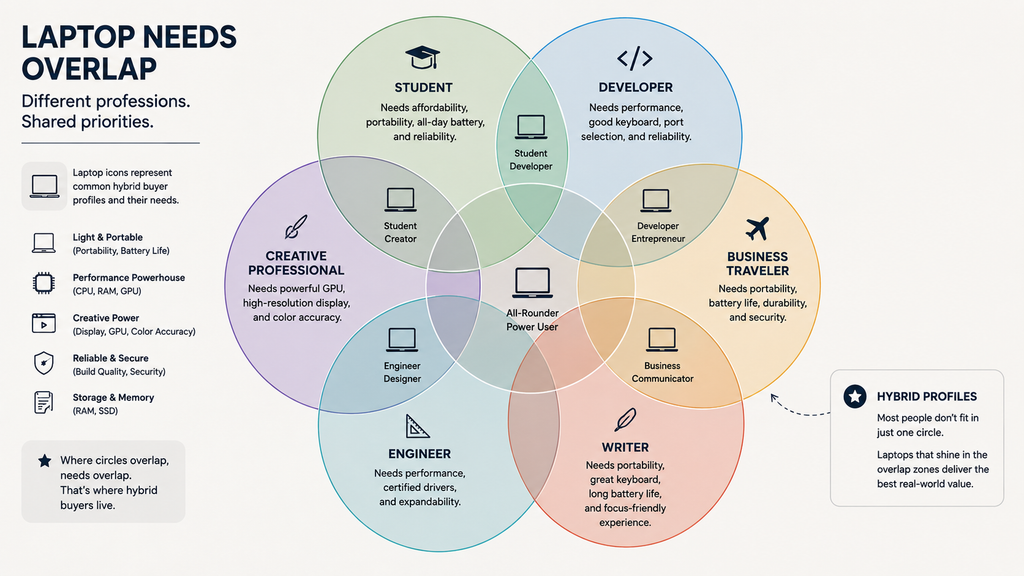
A student majoring outside CS/engineering should default to the Lenovo IdeaPad Slim 3x for the price-to-battery ratio; a CS or engineering student who needs x86 app compatibility should lean toward the MacBook Air instead, or budget for the developer section’s picks if their coursework is genuinely demanding. A developer who also does creative or ML side work should look at the MacBook Pro 14″ M5 Pro rather than the Dell XPS 14, since the extra GPU and RAM headroom pays off outside pure coding tasks. A creative professional who also travels frequently for client work should weigh the MacBook Pro’s 3.5 lb and stronger battery life against the ASUS ProArt P16’s raw power — the ProArt’s 4–6 hour battery under real editing load is a real constraint on the road. A business professional who writes long-form content as a major part of their job should read the writers section too — the ThinkPad X1 Carbon’s near-matte-adjacent option and genuinely excellent keyboard may matter more than its business-specific security features. An engineer or data scientist whose work is exclusively CAD with certification requirements should budget beyond this guide’s premium tier for an ISV-certified workstation card, rather than stretching either recommended pick to a job it isn’t built for. And a writer or researcher who’s realized the laptop itself is the distraction should seriously consider an e-ink writing tablet instead of another laptop entirely.
FAQ
What’s the single most important spec for a laptop, regardless of profession?
There isn’t one — that’s the core finding of this guide. RAM, GPU, battery life, and weight each matter enormously for some professions and barely at all for others. A student should prioritize battery and price; a creative professional should prioritize display accuracy and GPU class; a business traveler should prioritize weight and security features. Matching the spec to the actual workload matters more than any single number.
Is 16GB of RAM still enough for a laptop in 2026?
It depends entirely on what you’re doing. For students, writers, and most business professionals doing browsing, documents, and video calls, 16GB remains genuinely sufficient. For developers running containers or VMs, and creative professionals or engineers working with large files or datasets, 16GB should be treated as a floor rather than a comfortable target — 32GB is worth the upgrade cost for those workloads.
Should I trust the battery life number printed on a laptop’s spec sheet?
Treat it as a best-case number, not a real one. Every pick in this guide shows a gap between the manufacturer’s claim and independently tested results — sometimes small (Apple’s MacBook Air, roughly 2–3 hours off its “up to 18 hours” claim under real mixed use) and sometimes large (a ThinkPad X1 Carbon rated near 24 hours measured at only 5–7 hours under an actual writing workday in one review). The heavier your workload, the bigger that gap tends to get.
Do I need a discrete GPU if I’m not gaming or editing video?
No. For students, writers, business professionals, and most developers, integrated graphics handle the workload fine, and a discrete GPU mainly adds cost, weight, and reduced battery life without a meaningful benefit. It becomes essential specifically for creative rendering/export work, CUDA-accelerated machine learning, and CAD/3D modeling.
Is a MacBook or a Windows/Linux laptop better for my profession?
It depends on your software, not your profession broadly. Developers needing specific Linux tooling should look at Dell’s factory Ubuntu edition of the XPS 14 or another Linux-friendly business laptop; creative professionals in an Adobe-heavy or Final Cut workflow often prefer macOS; engineers needing CAD-certified drivers or CUDA-heavy ML work are better served by Windows workstation or gaming-class laptops with NVIDIA GPUs, since macOS options in that specific category are more limited.
What laptop weight actually counts as “portable”?
Most reviewers use roughly 3.5 lb as the comfort threshold for regular daily carry — anything lighter starts to disappear in a bag. Machines built for GPU-heavy engineering or creative workloads routinely run 4–6 lb once you include their larger batteries, cooling systems, and power bricks, which is a real tradeoff against portability that no amount of chassis design fully solves.